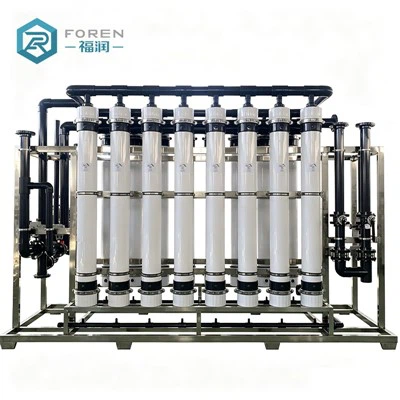

The reverse osmosis (RO) membrane is basically the heart of any RO water purification system-how well it works directly affects how much clean water you get and how good that water is. Unlike parts that last forever, RO membranes wear out over time: you'll notice less water coming out, the filtration isn't as effective, and eventually, you'll need to replace it. Below are the key things to keep in mind when swapping out your RO membrane, so the process goes smoothly and the new membrane works its best afterward.

Pre-Replacement Preparation
Before you start taking things apart, make sure a membrane replacement is actually needed. The easiest way to check is by keeping an eye on three key things: how much water the system produces (permeate flow rate), how well it removes salts (desalination rate), and the pressure difference in the system. It's also a good idea to take a quick look at the old membrane-if you see visible damage, dirt buildup, or wear, that's another sign it's time to replace it.
Next, gather all the tools and supplies you'll need to get the job done right. That includes basic hand tools like wrenches and screwdrivers (to take off and put back the bolts/nuts holding the membrane module), new sealing rings that match your original membrane (to prevent leaks), and a little bit of lubricant (to make installation easier and protect the seals). Most importantly, double-check that the new RO membrane is the same model and specs as the old one-using the wrong one can damage your system and mess up the water quality.
Finally, shut down the system properly for maintenance. Follow your equipment's instructions to close all the valves (inlet, product water, and concentrate valves) in the right order, then unplug the power. Open the drain valve to empty all the water from the system-this way, you won't have spills, damage the equipment, or run into safety issues while replacing the membrane.
Replacement Process Best Practices
When removing the old RO membrane, take your time and be careful to avoid damaging anything. Start by using a wrench to loosen and remove the bolts or nuts that hold the membrane module to the pressure vessel. If there are clamps or other fasteners keeping the module in place, take those off first. Once it's loose, gently pull the membrane module out of the pressure vessel-don't drop it, hit it, or scrape it. Even small damage can lead to contamination or make the membrane work poorly. Dispose of the old membrane properly so it doesn't harm the environment, or store it if needed.
After taking out the old membrane, spend a few minutes cleaning the pressure vessel thoroughly. Use a soft, clean cloth or sponge dampened with a mild cleaning agent that's safe for your system to wipe down the inside. This removes any leftover dirt, impurities, or bacteria that might have built up. For tough stains that won't come off easily, use a non-abrasive tool so you don't scratch the inside of the vessel. Rinse the vessel well with clean water afterward-any leftover cleaning product or debris can damage the new membrane and shorten its life.
Installing the new RO membrane requires a little attention to detail, especially when it comes to which way it goes. Most membrane modules have clear marks showing where the water comes in and goes out-make sure these line up with the system's water flow direction. Gently slide the new membrane into the pressure vessel; it should fit snugly but not so tight that you have to force it. Put a thin, even layer of lubricant on the new sealing rings, then install them in their correct spots on the membrane module to make sure there are no leaks. Finally, put the bolts/nuts back on both ends of the module and tighten them-but don't over-tighten, because that can crack the module or damage the seals.


Post-Replacement Commissioning & Inspection
Once the new membrane is installed, don't just turn the system up to full capacity right away. Instead, start it up gradually to protect the new membrane. Open the inlet valve slowly to let water flow into the system, and flush the membrane for 15–30 minutes. This flushing step gets rid of the protective solution that manufacturers put on the membrane to keep it in good shape during storage, as well as any surface dirt. After flushing, slowly open the permeate and concentrate valves, and adjust the system's settings (inlet pressure, water flow rates) to match what the manufacturer recommends.
While the system is running, keep a close eye on those key metrics we talked about earlier. Compare the new water flow, desalination rate, and pressure difference to the numbers you noted before the replacement-this will tell you if the new membrane is working like it should. If you notice anything off-like unusually low water flow, a sudden drop in how well it filters salts, or really high pressure-shut the system down right away to figure out what's wrong. Common issues include putting the membrane in backwards, leaking seals, or a defect in the new membrane itself
Last but not least, keep good records of the replacement. Write down the date you replaced it, the model and specs of the new membrane, and why you replaced the old one (like low water flow or poor filtration). These records are really useful for future maintenance-they help you track how long each membrane lasts, spot patterns in how they wear out, and plan for the next replacement.